QMS software vs spreadsheets: what changes when an auditor asks for evidence, and how to decide whether your quality process has outgrown Excel.
QMS software vs spreadsheets is a question most quality teams meet the first time an audit exposes how much of their evidence lives in personal files. A quality management system (QMS) is the set of processes an organisation uses to keep its work consistent and to improve it; QMS software holds those processes, records and actions in one place. Spreadsheets can do the job while the process is small. They struggle when more people, more sites and more scrutiny arrive.
Key takeaways
- An audit is mostly a test of evidence: can you show what happened, who owned it and what changed?
- Spreadsheets hold data well but are weak at ownership, version history, reminders and approvals.
- The cost of a spreadsheet shows up at audit time, in the hours spent assembling proof by hand.
- QMS software does not certify you or guarantee a result. It makes good practice easier to follow and to prove.
- Move when the manual effort of keeping records trustworthy exceeds the effort of running the process itself.
What does an auditor actually ask for?
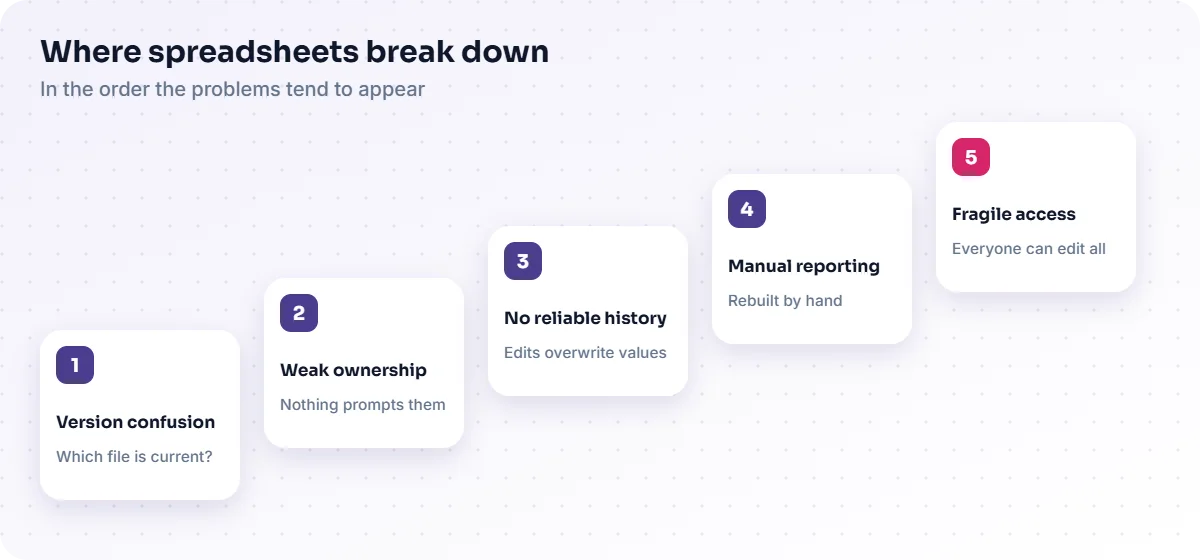
An auditor asks for evidence that your documented process is followed in practice. They sample records and follow the trail: a procedure, the people trained on it, an example of it being used, an issue that arose and the action taken. The questions are usually simple. Which version of this procedure was in force on that date? Who approved the change? Was the corrective action completed, and who checked it worked?
Those questions are about traceability. If the answers are scattered across inboxes, shared drives and several workbooks, each answer becomes a small research project.
Where do spreadsheets break down in a quality process?
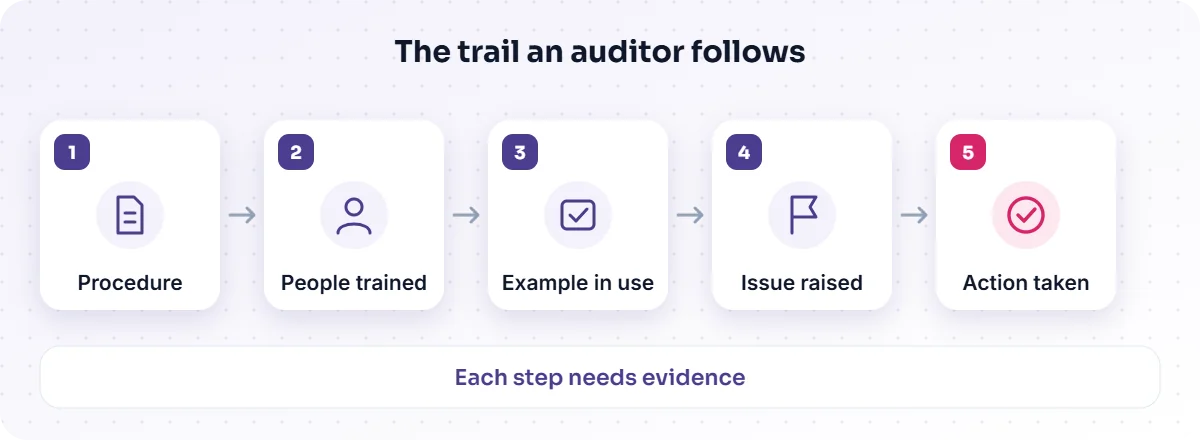
Spreadsheets break down where a process needs control rather than calculation. They record values, but they do not enforce who may change them, remember what a cell said last month or remind an owner that an action is overdue. The problems tend to appear in a predictable order:
- Version confusion. Copies multiply, and nobody is sure which file is current.
- Weak ownership. A row names an owner, but nothing prompts them or escalates when a date passes.
- No reliable history. Edits overwrite earlier values, so you cannot show what a record said when a decision was made.
- Manual reporting. Each summary is rebuilt by hand, so numbers differ between reports.
- Fragile access. Everyone with the file can change everything, or nobody except its author can use it.
None of these is a failure of the people using the spreadsheet. They are limits of the tool.
What changes in an audit when you use QMS software?
With QMS software the evidence is a by-product of doing the work. Records are created inside the workflow, each action has an owner and a date, and the history is kept. When an auditor asks for a trail, you open the record instead of reconstructing it.
| Audit task | With spreadsheets | With QMS software |
|---|---|---|
| Show the current procedure and its history | Search shared drives; compare file names and dates | Open the document record and its version history |
| Prove who approved a change | Look for an email or a signed page | Read the approval step on the record |
| Show an issue was followed up | Cross-check a log against emails | Follow the linked action from issue to closure |
| List what is overdue | Filter a sheet that may be out of date | Run a live view of open actions and owners |
| Control who can edit | Rely on file permissions and trust | Apply roles to each stage of the workflow |
The Quality Management System that TecBytz deploys is built around this idea: it organises supported quality workflows in one platform, in modules that match your needs, so records and follow-up sit together. It is a modular, ready-built product that we deploy, customise and integrate; see the Quality Management System page for what it covers.
Does QMS software make an organisation compliant or certified?
No. Software does not certify an organisation and cannot guarantee a result in any audit. Certification depends on your processes, your people and what the certifying body finds. What software can do is make it easier to follow the process you have defined and to show that you did. Be wary of any supplier that implies otherwise, and keep claims about standards out of your own marketing unless your certificate supports them.
How do you decide whether you have outgrown spreadsheets?
You have outgrown spreadsheets when the manual effort of keeping the records trustworthy is larger than the effort of running the process. Look for these signs:
- You spend days before each audit assembling evidence that should already exist.
- Different people hold different copies of the same register.
- Actions are missed because reminders depend on one person's memory.
- You cannot answer "what did this say in March?" without luck.
- New sites or teams need the same process, and copying the workbook is the plan.
If two or three of these are true today, the question is no longer whether to change, but how to change safely.
What should you move first?
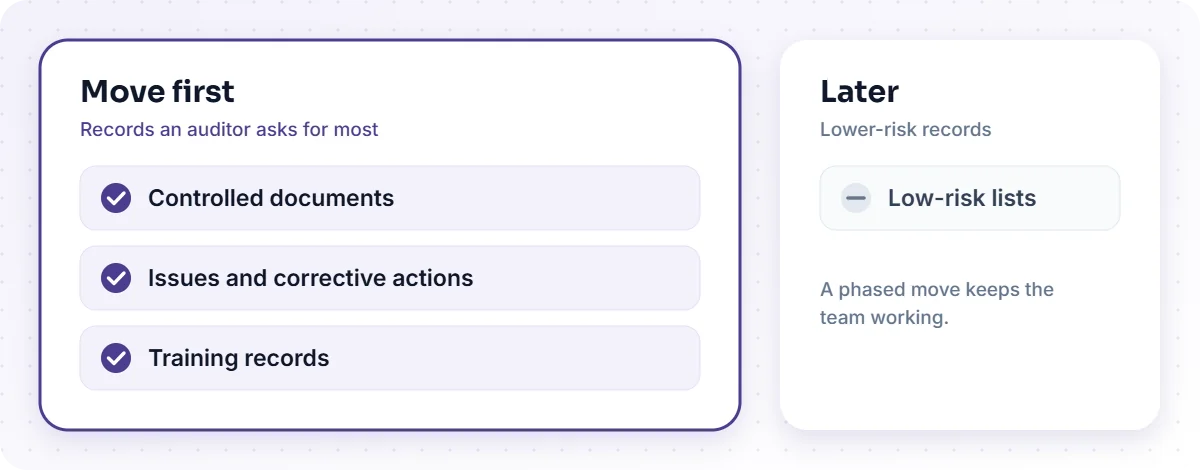
Start with the records an auditor asks for most and that cause the most rework: controlled documents, issues and corrective actions, and training records. Leave low-risk lists until later. A phased move keeps the team working while the new system earns trust.
- Map the process first. Write down who does what, in what order, with which approvals. Software reflects the process you give it; a confused process becomes a confused system.
- Clean the data. Decide what to migrate and what to archive. Not every old row deserves a place in the new system.
- Configure, do not over-customise. Match your taxonomy and approval steps, but resist rebuilding every quirk of the spreadsheet.
- Train and run in parallel briefly. Let people use the system on real work before the spreadsheet is retired.
- Review after the first audit cycle. Tune the workflow with what the audit showed you.
This is the kind of work our business process automation team does alongside deployment, and where integration is needed our enterprise application integration team connects the system to the others you run.
What does QMS software not fix?
It does not fix an unclear process, a lack of ownership or a culture that treats quality as paperwork. It will make those problems more visible, which is useful, but only if someone acts on what the system shows. Plan for the people side as carefully as the technology. A related article on automating non-conformance and CAPA workflows looks at how to design the follow-up step well.
Frequently asked questions
Is it wrong to use spreadsheets for quality records?
No. For a small team with a simple process, a well-run spreadsheet can be enough. The risk grows with the number of people, sites and records, and with the scrutiny you face.
Will QMS software make our audits easier?
It can reduce the effort of finding and presenting evidence, because records and history sit together. It does not change what the auditor expects of your process.
How long does a move from spreadsheets take?
It depends on the scope, the state of your data and how many processes you move at once. TecBytz gives you an estimate once we have looked at your processes during discovery.
Do we need to replace our other systems?
Not necessarily. A QMS can be connected to the systems you already use, depending on what is supported in your deployment.
Where to go next
If you are weighing up a move from spreadsheets, start by listing the three records that cost you the most time at your last audit. Then talk to us about whether the Quality Management System fits, or book a discovery call and we will help you map the process first.
Last updated: